Why TimeSense Went Native
· 1 min read · 0 views
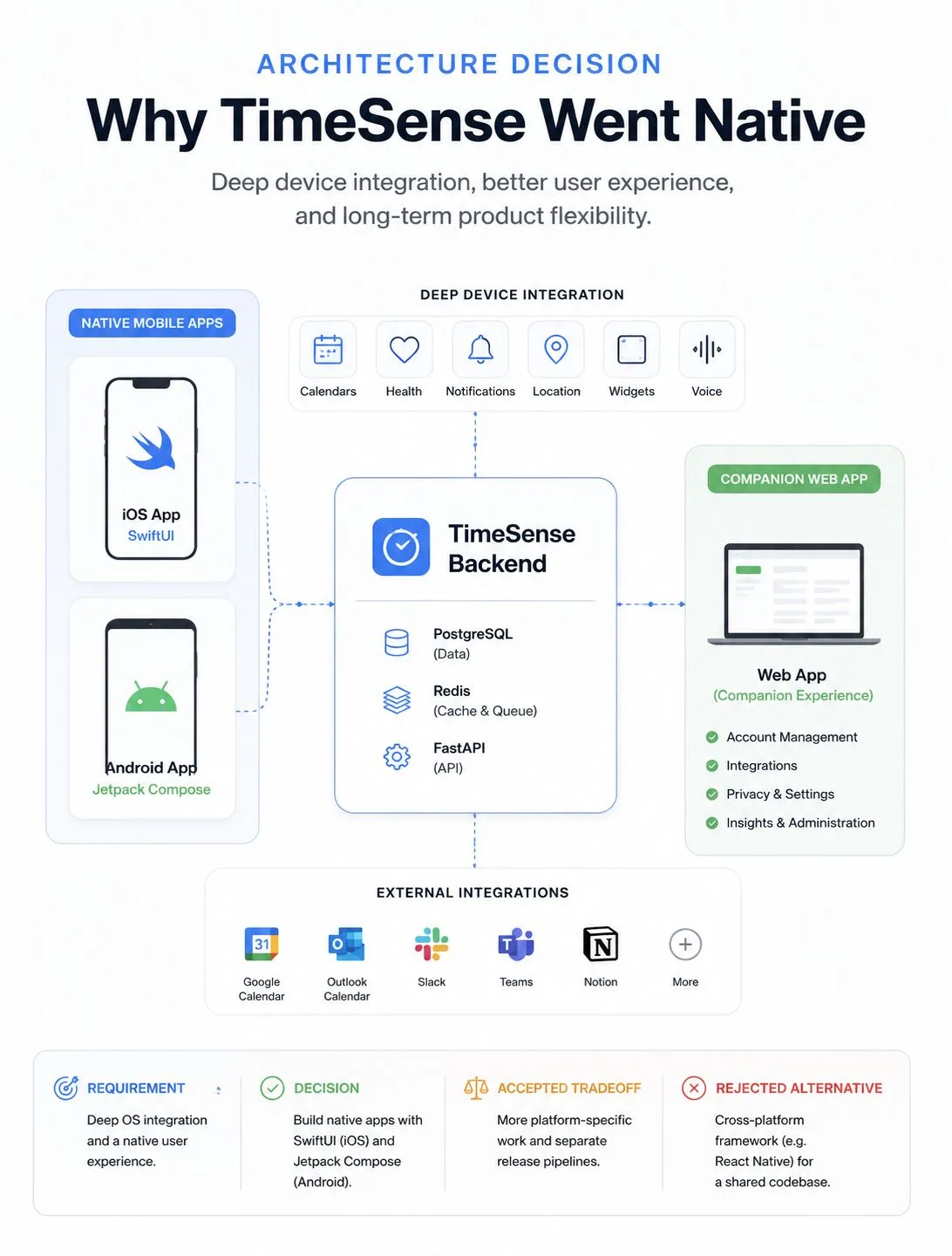
One of the first decisions I made with TimeSense was to build it as a true native mobile app rather than place a web application inside a mobile wrapper.
I considered a cross-platform framework because it would reduce duplicated development across iOS and Android.
But TimeSense depends heavily on native capabilities such as calendars, health data, notifications, widgets, voice input, location and background activity.
Once those features require native bridges and platform-specific debugging, much of the simplicity of a shared codebase disappears.
So I chose SwiftUI for iOS and Jetpack Compose for Android.
The tradeoff is more platform-specific development and separate release pipelines. The benefit is deeper control over the device, fewer abstraction layers and a product that feels native to each platform.
The website remains a companion experience, while every surface shares the same backend.
Architecture is not about choosing the most popular tools. It is about choosing the tradeoffs that fit the product.
Originally posted on LinkedIn.